
In discovery mode?
So are we!
The future of Voiijer is in your hands.
Thank you for being an early adopter of this revolutionary app. As part of our commitment to our explorer community, we are constantly optimizing the app experience with new and updated features.
Your feedback is encouraged and always welcome. If you cannot find what you need in the sections below, please contact us to ask questions or tell us how we can make Voiijer more useful.
Quick Start Guides
Overview
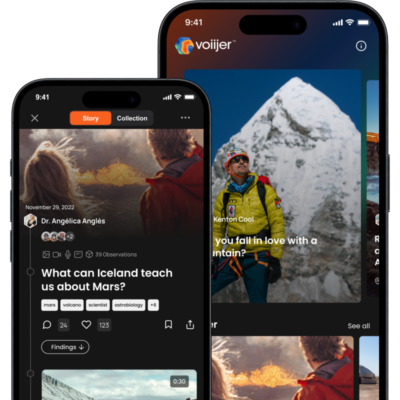
Start by creating an account and logging in. Once logged in, you can explore posts in the feed, search for content related to people, topics, or Voiij stories, create your own Voiij story, collaborate with others on Voiij stories, and manage your profile to update personal information and oversee your Voiij stories.
Your profile
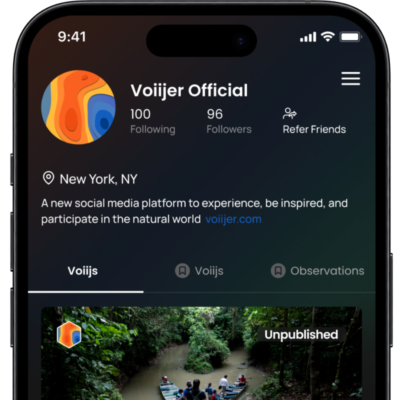
Your profile contains your information, saved Voiijs, and unpublished Voiijs. It’s public, but only published journeys are visible to others. You can follow other users and collaborate with them later.
Search
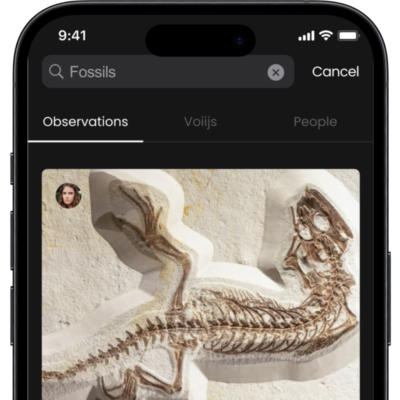
Search is the second icon in the menu at the bottom of the app. Search allows you to search for people, voiijs, topics, or observations. The search function is very literal. It’s looking for an exact match sequence of letters.
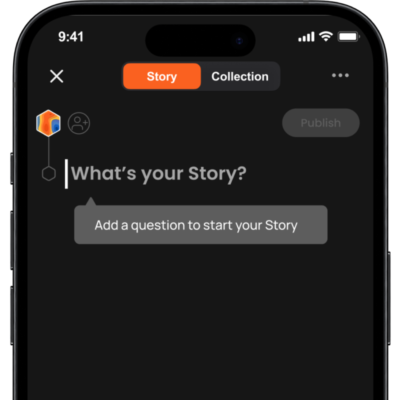
Start a New Voiij
When you press the Plus button in the app, you can begin a new “Voiij.” A Voiij has two parts: the story and the collection. Think of the collection as a storage spot for things related to your story. You can place items in the collection and then choose whether to use them in your story. If you put something in the story, it automatically goes into the collection.
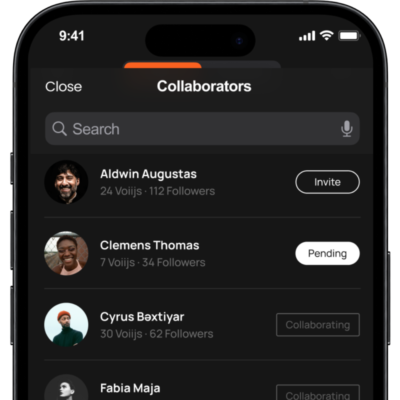
Collaboration
To invite someone to work with you on your project, add them to your collaboration list. But there’s a catch – you must follow them, and they must follow you back. This safety measure ensures you can only ask people you know on the app to collaborate with you. You can’t just invite anyone.
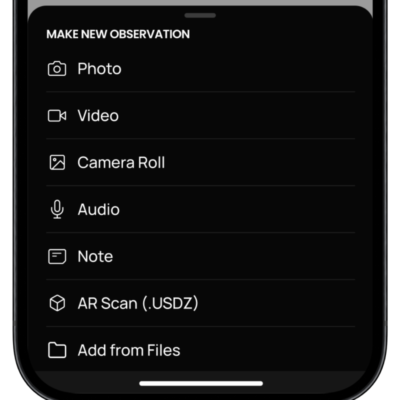
Make Observations
You can use Voiijer to record and save various types of observations. You can take pictures, videos and even record audio. You can also add notes, which are like messages you write about your observations.
FAQs
Thank you to everyone who has submitted questions! We’ll continue to refine this list to make it as comprehensive as possible.
Voiijer is inspired by the scientific method. It’s designed to be just as useful to scientists as it is explorers or even school projects.
- Ask Question/s
- Research > Hypothesis > Experiment > Analyze
- Then share your story of discovery!
While we love exploring and learning for the sake of raw knowledge, we’re also seeking answers to the bigger questions—and setting up a framework for a larger story, stronger engagement, and deeper discovery.
Stuck on what question to ask? Try these prompts to get you started:
- What if …
- Can [this] help [that]?
- How many [things] can I find [here]?
- Is [this] really the solution to [that]?
- What does a trip to [place] sound/look/feel like?
- Why is [this] disappearing?
- What will we find when we [do this, go here, try that]?
And remember—you as the owner can edit your question at any point, even after you have published your Voiij. Keep refining as your story takes shape!
That’s OK! A Voiij will save with a default title until you add a Question. Even without a Question, you can still
- Add collaborators
- Make observations and keep them in the Collection
- Work on it (alone or with a team) as long as you want.
A Question is only required when you want to add Observations to a Story, publish your Voiij, and share it with others.
Remember: You can find all your Voiijs on your Profile page. Published, unplushed, with or without a Question + Story.
We’ll answer your question with a Question—literally. To start your Voiij Story and add observations, you need to ask a Question.
Remember, there’s no pressure to get the Question right—you can change it at any time, even after your Voiij is published.
Currently, the app does not send an alert when an invite has been sent (by the Voiij owner), or accepted (by the Collaborator).
BECAUSE OF THIS, you’ll need to tell the collaborator you have invited them. It’s good practice to let them know outside the app (text, email) and remind them to check Notifications (the bell), where they can accept the invitation to collaborate.
Once you’ve accepted an invitation you will see the Voiij on your Profile under My Voiijs. You can now add your own observations to the Voiij, in the Story or Collection sections. You can add and remove observations in the Story. You can move observations up and down in order in the Story. You can edit and delete observations you have added, but you cannot edit or delete others’ observations.
Of course! All new Voiijs are UNPUBLISHED (private) by default. You have to PUBLISH a Voiij for others to see it (public). The only exception here is invited Collaborators who will have access to the Voiij regardless of it’s state: private or public.
Private Voiijs have an “UNPUBLISHED” label, which can be seen from the My Voiijs list on your Profile.
THIS IS ONE OF THE MOST USEFUL FEATURES OF VOIIJER. You can open as many Voiijs as you want (with an Explorer+ subscription) and keep adding to them over days, weeks, months, before publishing them – if ever. Voiijer becomes the place you keep things so you don’t lose sight of them. Where you collect observations so you can analyze and curate them later.
Keeping track of bugs or birds in your garden? Store them in a Voiij.
Conducting research interviews? Keep them in Voiijer.
Working with a team? Invite them to Collaborate on your Voiij knowing you’ll be the only ones who can see, analyze, and add observations.
Note: The Publish button is at the top of the Voiij Story and will be active if you have met the minimum requirements to Publish a Voiij (Question + at least one Observation).
Absolutely. You can change your Question (aka “Voiij name”) at any point.
Reminder: Only the Voiij Owner has the ability to edit a Question.
To create and upload Observations, please make sure to check that your file meets the following requirements:
- Access and connection to cellular or wifi service. You can not upload or make observations while the app is offline.
- File sizes under 100MB. File sizes are limited to 100MB. Large files, like scans or videos, are often too large to upload without compression.
- Voiijer videos under 4 minutes. Note that videos taken on a modern iPhone are limited to 50 seconds due to the high resolution and file size.
- No “Live” iPhone photos or GIFs.
- Correct file formats:
- Photos (.png, .jpg, .jpeg)
- Videos (.mp4, .mov)
- Audio files (.m4a, .mp3),
- Text files (.txt)
- 3D scans (.USDZ)
Still struggling with uploading and making an Observation? Click here to ask our team for help.
Voiijer readily accepts file sizes up to 100MB per observation. File sizes over 100MB will not be accepted.
Here are some general guardrails to consider:
- In-app Videos: Up to 4 minutes.
- iPhone videos: Up to 50 seconds.
- Images: Up to 100MB (generally everything)
- Audio Recordings: Typically around 1MB per minute.
- 3D Scans: Depending on file size. Click here for more information on 3D scans.
A Collaborator will be able to view and add observations to your Voiij.
Collaborators can:
- Add observations to the Voiij Collection or Story
- Edit or delete their own observations
- Add or remove any observation from the Story
- Change the observation order in Story
These permissions apply to UNPUBLISHED and PUBLISHED Voiijs. If a Voiij is already Published, a Collaborator can Manage (edit) it live.
Collaborators cannot:
- Edit or delete the observations of the Voiijer Owner or any other collaborators
- Edit the Voiij Question (name)
- Publish the Voiij.
- However, they can Manage (edit) a Voiij that is already live.
Note: Only a Voiij Owner can edit the Question or publish the Voiij.
Yes. When you publish a Voiij, it will be visible to others on the Home Page, in Search, and on your Profile.
Short answer: The Voiij Story is your journey to answer your Voijj Question. It’s your process, observations, and aha’s along the way.
Your Story can be told in many different ways.
- Add as many observations as you like
- Change the order of presented observations (using the up and down arrowsarros)
- Move observations in and out of the Collection
- Publish for public consumption or keep private.
Note: Please be sure to add Findings prior to publishing—this helps your audience better understand your discoveries and conclusions)
TIP: Many explorers choose to start their Story with a video explaining the importance of their question and the details that were important along the way.
Right now there is only one Story per Voiij, but in future we will have the ability to tell multiple Stories per Voiij, all using the same observations from the master Collection.
The Voiijer app currently accepts Apple’s native 3D file format .USDZ
3D files are just another observation type. The only difference is that you have to create the 3D (xxxx.usdz) file in another program, and then upload it into the app. You do this by selecting the ‘Add from Files’ option on the “+” menu within an active Voiij, then locating the .usdz file on your phone or connected file sharing app (see file sharing FAQ).
Check out this Voiij to learn more about 3D Observations on Voiijer. Here are some suggested apps you can use to create 3D scans. Each have free and premium options. or the Discussions & Deep-dives section below for suggestions on the three free apps you can use to create 3D scans to then upload into your Voiijs.
- Luma
- Metascan
- Scaniverse
- Polycam (in-app purchase required to create .usdz exports)
You can also:
- Find existing 3D scans with CC/CCO usage on Sketchfab (or public institutional sites).
- Convert existing scans you may have to .USDZ (Sketchfab Pro allows you to do this without 3D software).
- Voiijer ran a virtual workshop on creating 3D scans that you can watch on YouTube and there is a presentation deck linked in the description.
Yes! In fact, this is one of the handiest features of collaboration. When a Collaborators is invited to a Voiij they will see it no matter what state it is in: UNPUBLISHED (private) or PUBLISHED (public). This unlocks so many possibilities and makes it particularly useful for scenarios like:
- Ongoing research and project work where teammates need to collaborate while they work
- Live expeditions or trips where you want to review everyone’s content at the end of the day to plan for the next
- Personal projects or updates you only want family and friends to see and follow (family updates, house-hunting/renovations, pet topics like gardening or food)
As of Fall 2023, the Voiijer app is fully cloud-based and requires an active WiFi or cell signal for full functionality. While offline, you will not be able to create, update, or browse existing content. If you are in an area with poor connection, it is a good idea to make observations on your phone using the default camera or VoiceMemo app. You can upload them into the app when you are back on WiFi.
As of this writing, no. Once a Voiij is published, it cannot be undone. We’re working hard on this feature, so stay tuned for updates!
If you’ve published something accidentally, we may be able to support you from our side of things. Send an email with the Voiij name and question to our team here.
In the meantime, you still have editing capabilities (see next question for details)
Short answer: The Collection is like the Voiij back-up—all observations added to the Voiij will be saved in the Collection.
It is unstructured, meaning observations are added to the Collection in the order they are made or uploaded, and you cannot change the order. (You’ll have more control over this in the actual Story.)
Every observation is automatically housed in the Collection, even if it’s added directly to a Story. If an observation is removed from a Story, a copy will still remain in the Collection for safekeeping.
Absolutely! Select the ‘Add from Files’ option on the “+” menu inside an active Voiij.
You need to have an account with the file sharing platform you’d like to pull from, i.e. Google Drive, Dropbox, Box, etc. You need to have that app already installed on your phone. Then:
- Tap ‘Add from Files’ > it will default to On My iPhone so you need to tap < Browse
- From the Browse menu you can select connected file sharing locations

There is a file size limit of 75MB per file that also applies to media that is uploaded via file sharing into a Voiij. Uploaded files will need to be in accepted formats:
- Photos (.png, .jpg, .jpeg)
- Videos (.mp4, .mov)
- Audio files (.m4a, .mp3)
- Text files (.txt)
- 3D scans (.USDZ)
Each observation will automatically map to its observation type.
You can also add Photos and Videos from your phone’s Camera Roll.
Bookmarks allow you to save Observations and Voiijs for easy reference later.
The bookmark icon is located under the Voiij title (question) on any public Voiij. It is also under each individual observation in a Voiij. Simply tap it and it will fill in white when it is successfully bookmarked. All bookmarks will appear on your Profile in the ‘Bookmarked Voiijs’ and ‘Bookmarked Observations’ tabs.
We hope in future to allow you to create custom categories for grouping bookmarks, i.e. Birds.
Yes! There are lots of ways to share a Voiij. Share options are only available after a Voiij is published, and therefore publicly visible*.
Locate the Share options under the title (question) of any published Voiij. It is the icon on the far right with an arrow pointing up. Tap it to:
- Download the Teaser video (if the Voiij has one). It will save to your Photos app.
- Share the Teaser video directly to Instagram (Reels, Stories, Post).
- Tap More… to share the Teaser video by text, email and more.
- Share a link back to the Voiij. If someone who doesn’t have the app taps on it, they will be directed to the App Store to download the app first.
*To share a Voiij while it is still unpublished, you can add Collaborators.
To invite a Collaborator to a Voiij, you must both be following each other.
If you are already following each other (reciprocal following) they will appear in the Collaborators list at the top of a Voiij. You open this list to invite collaborators to a Voiij.
- To follow someone:
- Search for the person: Search > People tab.
- Tap on the person’s name and tap the “Follow” button at the top of their profile.
- Ask them to do the same and follow you (reciprocal following).
- To invite someone:
- Go to your Voiij and top the + button next to your avatar at the top of the Voiij Story.
- Locate the person you’d like to invite, and tap Invite.
- Their status will change to Pending.
- To accept an invite:
- Go to Notifications (the bell) and accept the invite.
- On your Profile, you will see the Voiij you just joined.
- If you don’t see it, pull down on the Voiijs list to refresh it (it may take a few minutes to appear).
You can share these instructions with people you invite
Note: Collaboration invitations do not currently trigger an alert or notification. You must check and accept manually.
You bet. Published Voiijs can be edited at any time. To make an edit, follow these steps.
- Go to the Voiij
- In the top-right corner tap on the three dots “…”
- Select ‘Manage’
- The Voiij is now back in Edit mode, where you can add, remove, and reorder as needed.
Not yet—but check back often as we’re working to make this functional soon!
To invite a Collaborator to a Voiij, you must both be following each other.
- To follow someone:
- Search for that person: Search > People tab.
- Tap on the person’s name and tap the “Follow” button at the top of their profile.
- Ask them to do the same (to follow you).
- To invite someone:
- Go to your Voiij and top the + button next to your avatar at the top of the Voiij Story.
- Locate the person and tap Invite..
- Their status will change to Pending.
- To accept an invite:
- Go to the Notifications page (the bell) and accept the invite.
- On your Profile page, you will see the Voiij you have been invited to collaborate on
- If you don’t see it, pull down on the Voiijs list to refresh it (it may take a few minutes to appear).
Note: Collaboration invites currently do not trigger an alert or notification. You must check and accept manually.
Of course! All new Voiijs are private by default. You have to “Publish” a Voiij before others can see it. The only exception here is with Collaborators—any Collaborator you’ve invited to your Voiij Story will be able to see and contribute to your Story before and after it is published.
Private Voiijs have an “UNPUBLISHED” label, which can be seen from the Voiijs list on your Profile.
Note: The Publish button is at the top of the Voiij Story and will be active if you have met the minimum requirements to Publish a Voiij (Question + at least one Observation).